
Compiling and Genie's Relation to C
This section gives an overview of Genie's relation to the C programming language. There are two useful points for anyone getting to know Genie. The first is of immediate practical use and that is Genie's relation to C libraries. C libraries can be easily used in Genie when a VAPI (Vala Application Programming Interface) file exists. The second is to gain an overview of what is going on in the background when valac is run. This will help to understand compiler feedback messages, organise larger projects, develop the Genie parser itself, etc.
When the command
valac hello.gswas issued, valac went through three stages, illustrated below:
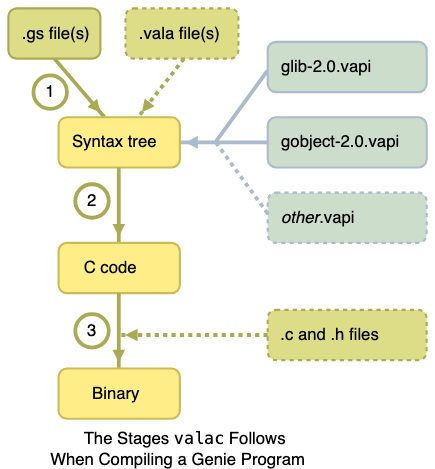
- Genie parser - converts the
hello.gsfile into an internal representation (a Vala abstract syntax tree). Note that.valafiles can be given as parameters tovalacat the same time, so Genie and Vala files are compiled to the same binary. - C code generation -
valacchecks that the internal representation is meaningful code (for example that identifiers are defined) and then produces C code. - C compiler -
valacthen calls on a C compiler. The default C compiler isgcc, but this can be altered with the--cc=COMMANDswitch. If.cand.hfiles are also given as parameters tovalacthen these files are passed to the C compiler and compiled to the same binary.
Using a C Library
Genie and Vala maintain a high level of compatibility with C programs and libraries. This is a powerful feature because it allows you to select from many efficient and well tested C libraries to use in your Genie code.
A translation file is used by the Vala compiler to translate the Genie or Vala syntax into the correct C code for use with a specific C library. A translation file is called a VAPI (Vala Application Programming Interface) file. By default valac includes two VAPI files when it compiles a Genie program. These are for GLib and GObject.
To use a C library three things need to be done:
- Install the library and its development files.
- Use the
--pkgswitch when callingvalac. - Use the library through its namespace.
For example, Genie's list and dictionary collection types are provided by libgee. To use libgee you will need to install the library. Its development files may be distributed separately, called something like libgee-devel or libgee-0.8-dev. To compile a Genie program that uses libgee:
valac --pkg gee-0.8 program.gsThe --pkg gee-0.8 tells valac to look for a VAPI file called gee-0.8.vapi and also a pkg-config file called gee-0.8.pc. The 0.8 signifies the version of the API. pkg-config files provide information on where the library files are stored on the system so they can be given automatically to the C compiler. Each library needs to be given as a separate --pkg switch:
valac --pkg gee-0.8 --pkg gio-2.0 program.gsThe VAPI will provide a namespace for the library. This is often slightly different to the VAPI filename. To use libgee without prefixing everything with Gee use the following Genie statement:
uses GeeThe namespace GLib is automatically included in Genie.
A Simple Build Script
A project will usually be made up of multiple source files and libraries. It is often easier to manage these with a build system. For a personal project of up to a few thousand lines of code, a single script is usually enough. By placing the source files and libraries over multiple lines in this simple script it helps to add and remove entries as the project evolves. The script would also use the --output switch in valac to produce a single named binary.
For Unix-like platforms, such as GNU/Linux and macOS, an example script would be:
#!/bin/sh
valac \
        src/init.gs \
        src/CLIOptions.gs \
        src/Configuration.gs \
        src/Logging.gs \
        src/devices/DeviceFactory.gs \
        src/devices/NoDevice.gs \
        src/devices/BlockDevice.gs \
        src/devices/FileAsDevice.gs \
        --pkg gio-2.0 \
        --pkg gee-0.8 \
        --output exampleprogram
For Windows this can be done with a .bat file:
valac src/init.gs ^
 src/CLIOptions.gs ^
 src/Configuration.gs ^
 --pkg gee-0.8 ^
 --output exampleprogram
For larger projects, consider using a proper build system such as Meson.
Compile Time Checks
The Vala compiler will run a number of checks on the Genie code. This is called static code analysis. One of the main checks carried out is to make sure data types match. This code:
init
    a:int = 1
    b:double = 3.5
    c:int = a + b
    print c.to_string()
will produce a compile time error similar to this:
type_error.gs:4.8-4.15: error: Assignment: Cannot convert from `double' to `int'
        c:int = a + b
              ^^^^^^^^
The message identifies the source file containing the error, type_error.gs, and the line number, 4. The characters at positions 8 to 15 on the line are identified as the error and these are also highlighted in the line below.
Example C Output
Usually valac will remove the C files produced after the binary has been compiled. The temporary C files can be kept by using the --save-temps switch. To produce just the C files use the --ccode switch. For example:
valac --ccode hello.gswill produce a file, hello.c, similar to this:
/* hello.c generated by valac, the Vala compiler
 * generated from hello.gs, do not modify */

#include <glib.h>
#include <glib-object.h>
#include <stdlib.h>
#include <string.h>

void _vala_main (gchar** args, int args_length1);

void _vala_main (gchar** args, int args_length1) {
        g_print ("Hello World\n");
}

int main (int argc, char ** argv) {
        _vala_main (argv, argc);
        return 0;
}
There is no need to learn C programming when using Genie, but understanding the process valac follows will help understand some of the messages you may encounter when compiling a Genie program. From the example above, you can see that the Genie print command is translated into GLib's g_print () function call.
Runtime Analysis
There are a number of sophisticated tools for analysing binaries produced from C code. valgrind is a good tool for checking memory use, and the GNU debugger, gdb, allows controlled execution of a binary. To embed Genie line numbers in the test binary use the --debug switch with valac.
In most cases, however, these tools will not be needed. Genie uses reference counting for memory management. In some data structures it is possible to create reference cycles and the memory is not freed; see Memory Management for more details. Memory leaks may also occur when a binding to a C library has not defined ownership correctly or there is a bug in the C library.