
GIO Samples
GIO is similar to the Java I/O framework. References to files and directories are represented by File objects, which you create from a path or a URI. GIO provides two base classes for input and output: InputStream and OutputStream. Opening a file for reading yields a FileInputStream, a subclass of InputStream.
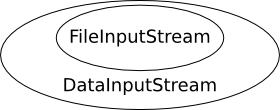
Streams can be wrapped (decorator pattern) for extra behaviour—for example, wrap a FileInputStream in a DataInputStream to read line by line, or use a FilterInputStream for custom filtering.
Build the programs below with GIO, for example:
valac --pkg=gio-2.0 example.valaReading Text File Line by Line
The following example reads the contents of a text file line by line and prints each line to standard output.
int main () {
    // A reference to our file
    var file = File.new_for_path ("data.txt");

    if (!file.query_exists ()) {
        stderr.printf ("File '%s' doesn't exist.\n", file.get_path ());
        return 1;
    }

    try {
        // Open file for reading and wrap returned FileInputStream into a
        // DataInputStream, so we can read line by line
        var dis = new DataInputStream (file.read ());
        string line;
        // Read lines until end of file (null) is reached
        while ((line = dis.read_line (null)) != null) {
            stdout.printf ("%s\n", line);
        }
    } catch (Error e) {
        error ("%s", e.message);
    }

    return 0;
}
Compile and Run
valac --pkg gio-2.0 gio-sample.vala
./gio-sample
Streams are closed automatically when they go out of scope (RAII); you do not need to close them explicitly.
File Objects
A File object represents a path to a resource (file or directory). It does not imply that the resource exists because the File object itself does not do I/O operations. It only stores the path. You can check if the File exists with File.query_exists ():
if (file.query_exists ()) {
    // File or directory exists
}
To test whether the resource is a directory, query its FileType:
if (file.query_file_type (0) == FileType.DIRECTORY) {
    // It's a directory
}
Create File instances from a path or a URI:
var data_file = File.new_for_path ("data.txt");
var message_of_the_day = File.new_for_path ("/etc/motd");
var home_dir = File.new_for_path (Environment.get_home_dir ());
var web_page = File.new_for_uri ("https://example.com/");
These are static factory methods, not constructors, because File is an interface; they return instances of classes implementing File.
GIO can access local files and many remote schemes (HTTP, FTP, SFTP, SMB, DAV, and more) through GVFS. Prefer passing File objects between APIs instead of raw strings when you work with paths. it will be very easy to derive paths for parent and child directories without having to agonize over string manipulations and path separators:
var home_dir = File.new_for_path (Environment.get_home_dir ());
var bar_file = home_dir.get_child ("foo").get_child ("bar.txt");
var foo_dir = bar_file.get_parent ();
Use get_path () for a full path string, or get_basename () for the last path component.
Some Simple File Operations
Creating, renaming, copying, and deleting files. These operations are synchronous.
int main () {
    try {
        // Reference a local file name
        var file = File.new_for_path ("samplefile.txt");

        {
            // Create a new file with this name
            var file_stream = file.create (FileCreateFlags.NONE);

            // Test for the existence of file
            if (file.query_exists ()) {
                stdout.printf ("File successfully created.\n");
            }

            // Write text data to file
            var data_stream = new DataOutputStream (file_stream);
            data_stream.put_string ("Hello, world");
        } // Streams closed at this point

        // Determine the size of file as well as other attributes
        var file_info = file.query_info ("*", FileQueryInfoFlags.NONE);
        stdout.printf ("File size: %lld bytes\n", file_info.get_size ());
        stdout.printf ("Content type: %s\n", file_info.get_content_type ());

        // Make a copy of file
        var destination = File.new_for_path ("samplefile.bak");
        file.copy (destination, FileCopyFlags.NONE);

        // Delete copy
        destination.delete ();

        // Rename file
        var renamed = file.set_display_name ("samplefile.data");

        // Move file to trash
        renamed.trash ();

        stdout.printf ("Everything cleaned up.\n");

    } catch (Error e) {
        stderr.printf ("Error: %s\n", e.message);
        return 1;
    }

    return 0;
}
On Windows, files cannot be renamed while they are open; the inner block ensures streams are released before later steps.
Compile and Run
valac --pkg gio-2.0 gio-file-operations.vala
./gio-file-operations
Writing Data
This sample creates an output file and writes text. For long writes, loop until all bytes are written.
int main () {
    try {
        // An output file in the current working directory
        var file = File.new_for_path ("out.txt");

        // Delete if file already exists
        if (file.query_exists ()) {
            file.delete ();
        }

        // Creating a file and a DataOutputStream to the file
        /*
            Use BufferedOutputStream to increase write speed:
            var dos = new DataOutputStream (new BufferedOutputStream.sized (file.create (FileCreateFlags.REPLACE_DESTINATION), 65536));
        */
        var dos = new DataOutputStream (file.create (FileCreateFlags.REPLACE_DESTINATION));

        // Writing a short string to the stream
        dos.put_string ("this is the first line\n");

        string text = "this is the second line\n";
        // For long string writes, a loop should be used, because sometimes not all data can be written in one run
        // 'written' is used to check how much of the string has already been written
        uint8[] data = text.data;
        long written = 0;
        while (written < data.length) {
            // sum of the bytes of 'text' that already have been written to the stream
            written += dos.write (data[written:data.length]);
        }
    } catch (Error e) {
        stderr.printf ("%s\n", e.message);
        return 1;
    }

    return 0;
}
Compile and Run
valac --pkg gio-2.0 gio-write-data.vala
./gio-write-data
Reading Binary Data
This sample reads BMP header fields and image data. Point File.new_for_path at a real .bmp file on your machine (the archived wiki used a remote URL that may no longer work).
int main () {
    try {

        // Reference a BMP image file
        var file = File.new_for_uri ("http://wvnvaxa.wvnet.edu/vmswww/images/test8.bmp");
        // Alternative:
        // var file = File.new_for_path ("sample.bmp");

        // Open file for reading
        var file_stream = file.read ();
        var data_stream = new DataInputStream (file_stream);
        data_stream.set_byte_order (DataStreamByteOrder.LITTLE_ENDIAN);

        // Read the signature
        uint16 signature = data_stream.read_uint16 ();
        if (signature != 0x4d42) { // this hex code means "BM"
            stderr.printf ("Error: %s is not a valid BMP file\n", file.get_basename ());
            return 1;
        }

        data_stream.skip (8); // skip uninteresting data fields
        uint32 image_data_offset = data_stream.read_uint32 ();

        data_stream.skip (4);
        uint32 width = data_stream.read_uint32 ();
        uint32 height = data_stream.read_uint32 ();

        data_stream.skip (8);
        uint32 image_data_size = data_stream.read_uint32 ();

        // Seek and read the image data chunk
        uint8[] buffer = new uint8[image_data_size];
        file_stream.seek (image_data_offset, SeekType.CUR);
        data_stream.read (buffer);

        // Show information
        stdout.printf ("Width: %ld px\n", width);
        stdout.printf ("Height: %ld px\n", height);
        stdout.printf ("Image data size: %ld bytes\n", image_data_size);

    } catch (Error e) {
        stderr.printf ("Error: %s\n", e.message);
        return 1;
    }

    return 0;
}
Compile and Run
valac --pkg gio-2.0 gio-binary-sample.vala
./gio-binary-sample
Enumerating Directory Content
int main (string[] args) {
    try {
        var directory = File.new_for_path (".");

        if (args.length > 1) {
            directory = File.new_for_commandline_arg (args[1]);
        }

        var enumerator = directory.enumerate_children (FileAttribute.STANDARD_NAME, 0);

        FileInfo file_info;
        while ((file_info = enumerator.next_file ()) != null) {
            stdout.printf ("%s\n", file_info.get_name ());
        }

    } catch (Error e) {
        stderr.printf ("Error: %s\n", e.message);
        return 1;
    }

    return 0;
}
Compile and Run
valac --pkg gio-2.0 gio-ls.vala
./gio-ls
Asynchronous File Listing
GTK+ 3
This example needs GTK+ 3 (gtk+-3.0). Install your distribution’s GTK+ 3 development packages to compile and run it. For a console-only asynchronous directory listing using the same GIO calls, see the GIO Example on the Async Method Samples page.
Learn more about GTK at gtk.org.
This sample loads files from the user’s home directory with asynchronous GIO calls and shows them in a GTK+ list view (adapted from the archived GNOME Wiki).
using Gtk;

/**
 * Loads the list of files in the user's home directory and displays them
 * in a GTK+ list view.
 */
class ASyncGIOSample : Window {

    private ListStore model;

    public ASyncGIOSample () {

        // Set up the window
        set_default_size (300, 200);
        this.destroy.connect (Gtk.main_quit);

        // Set up the list widget and its model
        this.model = new ListStore (1, typeof (string));
        var list = new TreeView.with_model (this.model);
        list.insert_column_with_attributes (-1, "Filename",
                                            new CellRendererText (), "text", 0);

        // Put list widget into a scrollable area and add it to the window
        var scroll = new ScrolledWindow (null, null);
        scroll.set_policy (PolicyType.NEVER, PolicyType.AUTOMATIC);
        scroll.add (list);
        add (scroll);

        // Start file listing process
        list_directory.begin ();
    }

    private async void list_directory () {
        stdout.printf ("Start scanning home directory\n");
        var dir = File.new_for_path (Environment.get_home_dir ());
        try {
            // Asynchronous call to get directory entries
            var e = yield dir.enumerate_children_async (FileAttribute.STANDARD_NAME,
                                                        0, Priority.DEFAULT, null);
            while (true) {
                // Asynchronous call to get entries so far
                var files = yield e.next_files_async (10, Priority.DEFAULT, null);
                if (files == null) {
                    break;
                }
                // Append the files found so far to the list
                foreach (var info in files) {
                    TreeIter iter;
                    this.model.append (out iter);
                    this.model.set (iter, 0, info.get_name ());
                }
            }
        } catch (Error err) {
            stderr.printf ("Error: list_files failed: %s\n", err.message);
        }
    }

    static int main (string[] args) {
        Gtk.init (ref args);

        var demo = new ASyncGIOSample ();
        demo.show_all ();

        Gtk.main ();
        return 0;
    }
}
Compile and Run
valac --pkg gtk+-3.0 gio-async.vala
./gio-async
Asynchronous Stream Reading
MainLoop main_loop;

async void read_something_async (File file) {
    var text = new StringBuilder ();
    print ("Start...\n");

    try {
        var dis = new DataInputStream (file.read ());
        string line = null;
        while ((line = yield dis.read_line_async (Priority.DEFAULT)) != null) {
            text.append (line);
            text.append_c ('\n');
        }
        print (text.str);
    } catch (Error e) {
        error (e.message);
    }
    main_loop.quit ();
}

void main (string[] args) {

    var file = File.new_for_uri ("https://www.gnome.org/");

    if (args.length > 1) {
        file = File.new_for_commandline_arg (args[1]);
    }

    main_loop = new MainLoop ();
    read_something_async (file);
    main_loop.run ();
}
Compile and Run
valac --pkg gio-2.0 gio-async-reading.vala
./gio-async-reading
Network access is required when using the default URI.